Choose how to install
Pick the path that fits your phone and your privacy needs. Every option installs the exact same app, signed with our own key.
iPhone & iPad
Get PikaSim from the App Store.

Android (Play Store)
The easy route if you use Google Play.

Direct APK, no Google
Download straight from us. No Google account, no store tracking. Verify the signature before installing.
Download the APKGrapheneOS & de-Googled
Runs fully without Google Play Services. Browse, buy, top up, and manage eSIMs with zero Google dependency. See what to expect.
Download the APKObtainium (auto-update)
Track PikaSim straight from pikasim.com and get notified on every new release. No store account needed.
How to add itOur F-Droid repo
Run F-Droid? Add our own repository and manage PikaSim updates right in the F-Droid app. No Google, fully signed.
Add the repoAccrescent Planned
We are working toward a listing on Accrescent, the app store built for GrapheneOS. Watch this space.
On iPhone or iPad? The .apk options are Android only. Get PikaSim from the App Store instead.
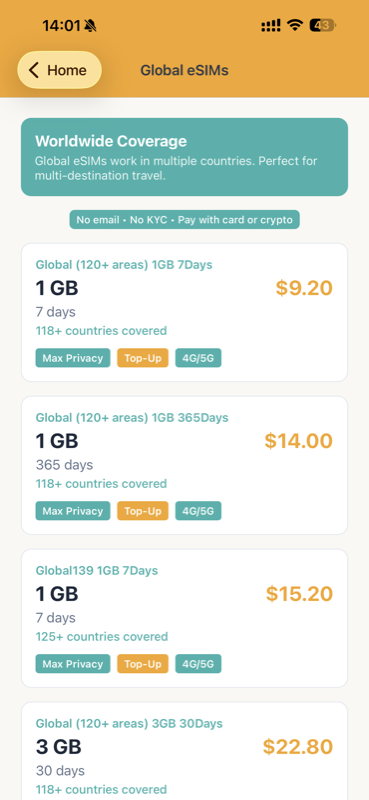
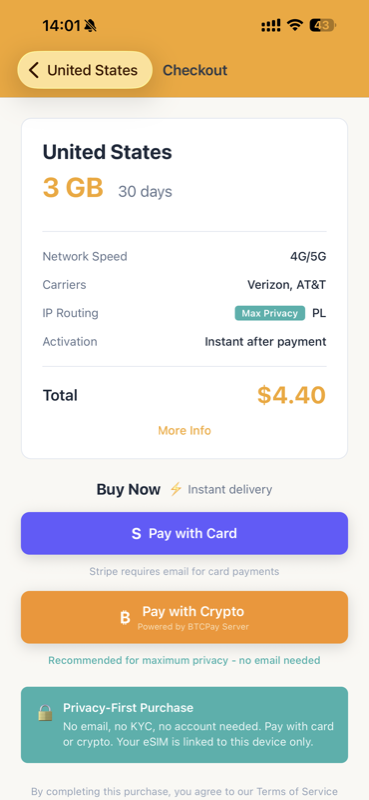
Made to run without Google
If you run GrapheneOS, CalyxOS, /e/OS, LineageOS, or any de-Googled Android, PikaSim just works. There is no Google Play Services requirement baked into the core app.
Works with zero Google
- Browse 190+ countries
- Buy eSIMs with crypto or card
- Install, top up, and manage lines
- SMS verification numbers and wallet
The one caveat
- Push notifications need Play Services
- So low-data alerts won't arrive de-Googled
- The app detects this and never nags you
- Everything else is identical
No account, no email, ever. PikaSim identifies your device with a random on-device ID, not your identity. Pair that with a verified direct APK and crypto payment and you have a genuinely anonymous mobile data setup.
Why We Built the App
Most eSIM apps require you to create an account, verify your email, and hand over personal data before you can even browse packages. We built the PikaSim app differently.
Our website has always been privacy-first: no account required, no email needed, instant purchase with crypto or card. We wanted an app that works the same way - giving you mobile access to buy and manage eSIMs without sacrificing your privacy.
The result is an app that identifies your device using a unique device ID - not your email, not your phone number, not a password. Just your device.
How It Works
No Login Required
- No email address needed
- No password to remember
- No account creation
- No identity verification
Device-Based Identity
- Unique ID tied to your device
- Your eSIMs sync automatically
- Private and anonymous
- No personal data stored
How does this work? When you open the app, it generates a unique identifier tied to your device. This ID is used to associate your purchases with your device - not with your identity. If you buy an eSIM on the website and enter the same device ID, it shows up in your app automatically.
SMS Verification Built In
Need a verification code? The app has a dedicated SMS tab. Order a quick one-time number (auto-refunded if no code arrives in 20 minutes) or rent a number for longer, and pay from your in-app wallet with card or crypto. Mostly real non-VoIP mobile numbers that pass checks blocking virtual numbers. See how SMS verification works in the app →
Privacy-First Design
Minimal Data Collection
- We don't store your name
- We don't store your email
- We don't track your location
- We don't sell your data
Only Essential Alerts
- Notifications only for low data
- No marketing messages
- No promotional push notifications
- You control what you receive
The only notifications you'll receive are usage alerts when your data is running low. That's it. No marketing, no "special offers," no spam. We believe your phone should work for you, not against you.
Pay Your Way
Cryptocurrency
- Bitcoin (on-chain)
- Lightning Network
- Monero (XMR)
- Maximum payment privacy
Traditional Payment
- Credit cards accepted
- Debit cards accepted
- Secure Stripe checkout
- Instant delivery
Whether you prefer the privacy of cryptocurrency or the convenience of card payments, both options are available directly in the app. Crypto payments are processed through our self-hosted BTCPay Server - no third-party payment processor in the middle.
Verify your download
Every official PikaSim APK is signed with our own key. Before installing, confirm the signing certificate matches this SHA-256 fingerprint:
20:F2:0F:53:83:50:3F:3B:66:E9:DE:4B:7D:7D:5A:CD:27:28:62:93:41:90:6F:41:47:C6:D0:F2:DA:C8:BE:3E
Check it with apksigner verify --print-certs pikasim-latest.apk. Only ever install a PikaSim APK downloaded from pikasim.com. We will never ask you to install it from a link sent by email, chat, or social media.
How to Install
- Download the APK from this page
- Open the downloaded .apk file
- Allow "install from unknown sources" if prompted
- Open PikaSim and you're done
Stays Up To Date
- The app updates itself in the background
- Or track it in Obtainium for a store-free updater
- Same app and features as the store version
- No Google or Apple account ever required
Track PikaSim in Obtainium
Obtainium gets app updates straight from the source, no app store in the middle. Add PikaSim once and it notifies you whenever we ship a new release.
Add PikaSim in three steps:
- Open Obtainium and tap Add App.
- Paste this URL: https://pikasim.com/downloads/pikasim-latest.apk
- Pick the Direct APK Link source type and tap Add. Obtainium watches the file and flags every update automatically.
Add our F-Droid repository
Already using the F-Droid app? Add the official PikaSim repository and manage PikaSim like any other F-Droid app, with update notifications, right inside F-Droid. No Google, no account, and every build is signed with our own key.
One-tap: on your phone, open this link and F-Droid will offer to add the repo with the fingerprint already verified:
Or add it manually. In F-Droid go to Settings → Repositories → add, and enter:
- Repo URL: https://pikasim.com/fdroid/repo
- Fingerprint (SHA-256): A0:0D:EF:CF:B5:B9:14:DB:F4:03:33:70:7A:AC:51:30:F2:3C:62:23:18:47:8C:9D:3D:89:CD:E1:9F:47:28:26
Then find PikaSim in F-Droid and install. This repo works in Obtainium too (add it as an F-Droid repo source).
Common Questions
Does the app work on GrapheneOS without Google Play Services?
Yes. Browsing, buying, installing, topping up, and managing eSIMs, plus SMS verification and the wallet, all work with zero Google dependency. The only feature that needs Play Services is push notifications, so on a de-Googled device you won't get low-data usage alerts. The app detects this and won't nag you about it.
How do I keep the direct APK up to date without a store?
Two ways. The app can update itself in the background, or you can add it to Obtainium (Direct APK Link source, URL above) and get a notification on every new release. No Google account required either way.
Do I need to create an account?
No. The app uses your device's unique identifier to associate purchases with your device. No email, no password, no account creation required.
What if I switch phones?
Your device ID is shown in the app settings. Save it somewhere secure, and you can enter it on a new device to access your eSIMs.
Can I buy eSIMs on the website and see them in the app?
Yes! When purchasing on the website, enter your device ID (found in the app) and your eSIMs will automatically appear in the app.
Is the direct Android download safe?
Yes. The .apk is the same app we publish to the Play Store, signed with our own key. You can verify the signing fingerprint shown above before installing. Only download it from pikasim.com.
Is PikaSim on F-Droid or Accrescent?
We run our own F-Droid repository, so you can add it to the F-Droid app and get native update notifications today (see "Add our F-Droid repository" above). Accrescent, the store GrapheneOS recommends, is on our roadmap. Between our F-Droid repo, Obtainium, and the verified direct APK, you have a fully store-free, no-Google path right now.
The PikaSim app is mobile eSIM management done right.
No account. No login. No tracking. No Google required.
Browse 190+ countries, pay with crypto or card, and manage your data - all without handing over your personal information.