Pay with Monero: The Gold Standard for Private Payments
Bitcoin is pseudonymous. Monero is private by default. Every transaction is shielded with ring signatures, stealth addresses, and RingCT, meaning nobody can trace your payment. We spent weeks setting up a full Monero node on our BTCPay Server so we could accept XMR natively, with no third-party swaps or conversions.
Why Monero Is the Most Private Way to Pay
Monero was built from the ground up for privacy. Unlike Bitcoin, where every transaction is visible on a public blockchain, Monero hides the sender, receiver, and amount by default.
Ring signatures mix your transaction with others, making it mathematically impossible to determine who sent the payment.
RingCT (Ring Confidential Transactions) hides the amount of every transaction. Nobody can see how much you paid.
Every transaction generates a one-time address, so your receiving address is never linked to transactions on the blockchain.
Companies like Chainalysis can trace Bitcoin. Monero's privacy is protocol-level. There is no "transparent mode" to turn off.
Every XMR coin is identical. No coin can be "tainted" or blacklisted based on its history, unlike Bitcoin where exchanges reject coins from certain addresses.
We Accept Monero the Right Way
Most services that "accept Monero" actually use a third-party swap service that converts your XMR to Bitcoin before the merchant ever sees it. That defeats the purpose. Here is how we do it differently:
Full Monero Node
We run monerod on our own BTCPay Server. Your payment goes directly to our Monero wallet. No intermediaries, no swap services, no conversion to BTC.
Self-Hosted BTCPay Server
Our payment processor is BTCPay Server, fully open-source and running on our own hardware. No Coinbase Commerce, no BitPay, no third parties.
No KYC, No Accounts
We do not require an account, email, or any personal information. Combined with Monero's privacy, your purchase is completely unlinkable to your identity.
We Hold XMR
When you pay in Monero, we receive Monero. We do not auto-convert to fiat or Bitcoin. Your privacy is not undermined by a conversion step on our end.
Monero vs. Bitcoin: Privacy Comparison
Both are accepted at PikaSim. Here is how they compare on privacy:
| Privacy Feature | Bitcoin | Monero |
|---|---|---|
| Transaction Visibility | Public (anyone can view) | Hidden by default |
| Sender Identity | Pseudonymous (address visible) | Hidden (ring signatures) |
| Amount Sent | Visible on blockchain | Hidden (RingCT) |
| Receiver Address | Visible on blockchain | Hidden (stealth addresses) |
| Blockchain Analysis | Routinely traced by firms | Mathematically resistant |
| Coin Fungibility | Coins can be blacklisted | All coins identical |
| Transaction Fees | Variable ($0.50 - $5+) | Low (~$0.01) |
| Confirmation Time | ~10 minutes (1 conf) | ~2 minutes (1 conf) |
How to Pay with Monero at PikaSim
The entire process takes about 5 minutes. Here is exactly what happens:
Pick Your eSIM Package
Browse our 190+ country packages on the website or in the PikaSim app. Select the data plan and duration you need. No account or login required.
Select "Pay with Crypto"
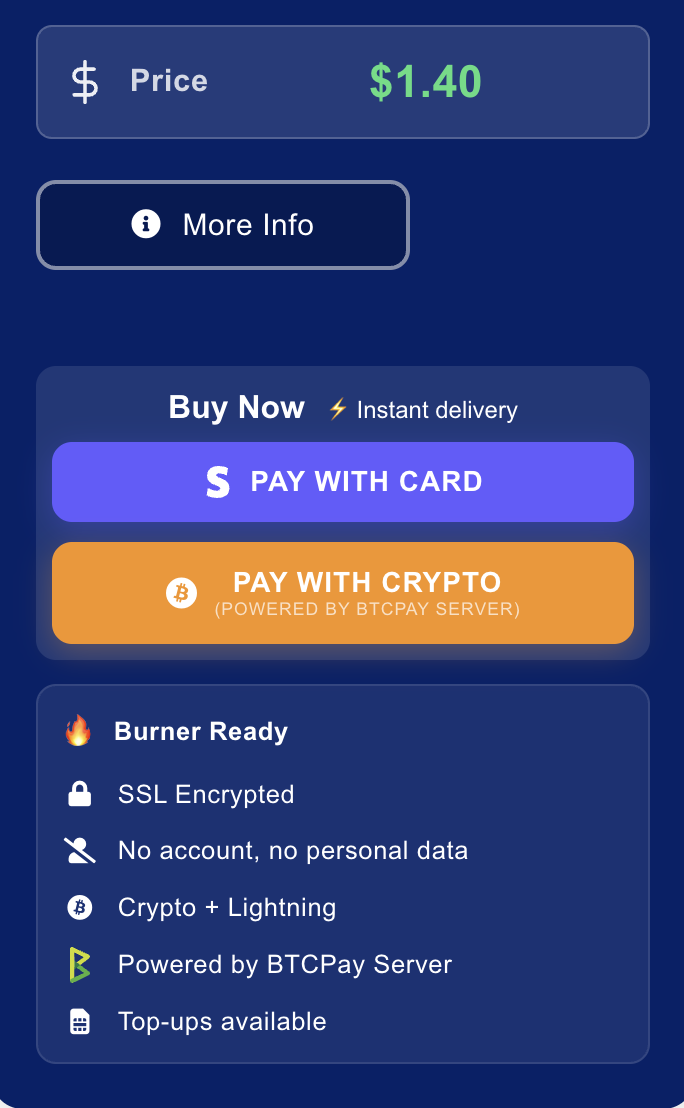
At checkout, click the orange "Pay with Crypto" button. This redirects you to our BTCPay Server invoice page.
Choose Monero
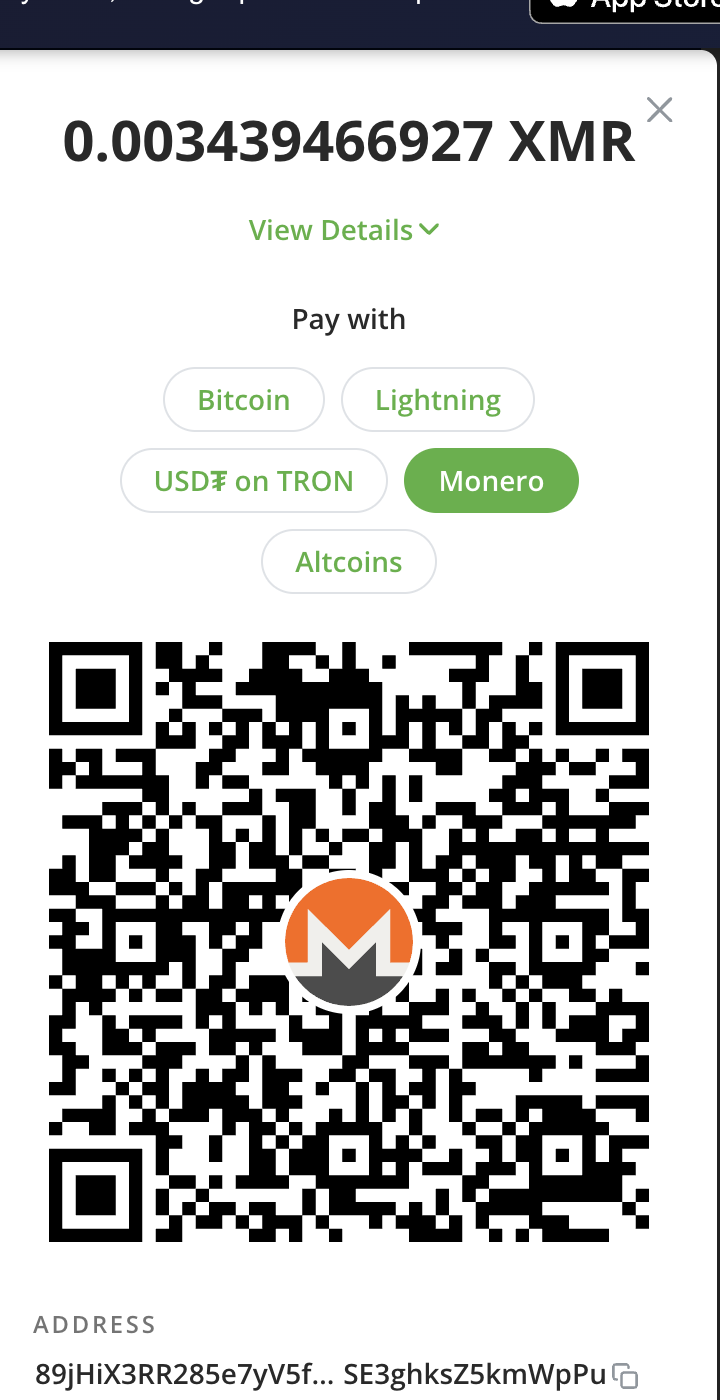
On the BTCPay checkout page, you will see payment method tabs: Bitcoin, Lightning, USDT on TRON, Monero, and Altcoins. Select Monero. The invoice shows the exact XMR amount and a QR code you can scan with your Monero wallet.
Send XMR from Your Wallet
Scan the QR code or copy the Monero address into your wallet. Send the exact amount shown. Monero transactions typically confirm in about 2 minutes (1 block confirmation).
Get Your eSIM Instantly
Once confirmed, your eSIM is provisioned automatically. The QR code and install instructions appear on the invoice page. Scan the QR code with your phone's camera to install the eSIM.
Pay with Monero in the PikaSim App
The same flow works in our mobile app. The app opens your phone's browser for the BTCPay checkout, then returns you to the app once payment confirms.
Browse and Select
Open the PikaSim app (no login needed), pick a country, choose a package.
Tap "Pay with Crypto"
The app opens the BTCPay invoice in your browser. Select Monero from the payment options.
Send and Return
Pay from your Monero wallet. Once confirmed, the eSIM appears in your "My eSIMs" screen in the app. Tap to install.
How to Get Monero
New to Monero? Here are the best ways to acquire XMR while preserving your privacy:
Atomic Swaps (BTC to XMR)
Most private. If you already have Bitcoin, use atomic swaps to convert to Monero without any intermediary. Tools like UnstoppableSwap make this straightforward.
Decentralized Exchanges
No KYC. Platforms like Haveno (the Monero fork of Bisq) let you buy XMR peer-to-peer with bank transfer, cash, or other payment methods. No identity verification required.
Centralized Exchanges
Easiest for beginners. Kraken still supports XMR withdrawals in many jurisdictions. Buy with fiat and withdraw to your own wallet immediately.
Mining
Earn it yourself. Monero uses RandomX, designed for CPU mining. You can mine XMR on any computer without specialized hardware.
Recommended Monero Wallets
You will need a Monero wallet to store and send XMR:
- Desktop: Monero GUI Wallet (official, full node or remote node)
- Mobile: Cake Wallet (iOS/Android, also supports BTC/LTC swaps)
- Mobile: Monerujo (Android, open-source, lightweight)
- CLI: Monero CLI Wallet (for advanced users, maximum control)
- Hardware: Ledger Nano S/X (cold storage for larger amounts)
Our Monero Infrastructure
We invested significant time getting Monero payments right. Here is what runs behind the scenes:
Full monerod Node
A fully synced Monero daemon runs on our BTCPay server. It validates your transaction independently. We do not rely on remote nodes or third-party APIs.
BTCPay Server Integration
BTCPay Server connects to our monerod instance and generates unique Monero subaddresses for each invoice. Open-source, auditable, no middleman.
Direct to Wallet
Payments go directly into our Monero wallet. No swap service converts your XMR. No exchange sees your transaction. The privacy chain is unbroken.
Weeks of Setup
Syncing the full Monero blockchain, configuring the RPC interface, integrating with BTCPay, and testing edge cases took weeks. Most services skip this and use a swap API. We did not.
Monero Payment FAQ
How long does a Monero payment take?
Monero blocks are mined approximately every 2 minutes. Once your transaction is included in a block, your eSIM is provisioned automatically. The entire process typically takes 2 to 5 minutes.
What if I send the wrong amount?
If you underpay, you can send the remaining amount. If you overpay slightly, the extra is treated as a tip. For significant overpayments, contact our help center.
What if the invoice expires?
Invoices have a 30-minute window. If it expires before you pay, create a new order. If you sent funds to an expired invoice, contact us. Because we run our own node, we can verify the payment.
Can I get a refund in Monero?
Refunds for unactivated eSIMs are processed in Bitcoin (on-chain or Lightning). Due to the one-way nature of Monero stealth addresses, we cannot send XMR back to the address you paid from. We will provide a BTC refund link instead.
Do you convert my XMR to Bitcoin?
No. We receive and hold Monero directly. There is no swap, no conversion, and no third-party exchange involved. Your payment stays in XMR.
Why Monero over Bitcoin for privacy?
Bitcoin transactions are visible on a public ledger. Blockchain analysis firms routinely trace Bitcoin payments. Monero hides the sender, receiver, and amount at the protocol level. If payment privacy is your priority, Monero is the clear choice.
Ready to Buy an eSIM with Monero?
Browse our packages and select "Pay with Crypto" at checkout. Choose Monero on the payment page. No account, no email, no trace.